How to Type Faster When You Already Type: My Path From Chaotic to Touch Typing
I already knew how to type on a keyboard before I started learning touch typing. Not with two fingers like a lot of people, but not in any systematic way either. Here's how I went from that kind of chaotic typing to touch typing - and what it actually gave me. Not what I was expecting.
Before Touch Typing: I Could Type, But Chaotically
I'm a programmer, I've been typing every day for years. I never had a "proper" finger position - I didn't place my fingers on ASDF and JKL;, different fingers just reached for different keys on their own. Muscle memory from years of typing did its thing. Speed was somewhere around 30-40 words per minute - not fast, but not a disaster either.
The main problem wasn't speed, it was errors. I was constantly going back and fixing things. Sometimes I needed to type in Russian and the keyboard only had English letters on it - and even that became manageable over time, muscle memory handled it. But the typos were still there in any case.
I think a lot of people end up like this on their own, without ever learning a method - when you've worked at a computer for a decade, your fingers remember the keys, but without any system. And that's the starting point I'm talking about - not "two fingers," not "blind," but somewhere in the middle.
Why I Tried Again
I tried to learn touch typing a few times before - back in school and university - and quit every time. I wrote about those past attempts in detail in another article: How to Learn Touch Typing: What I Tried, What Failed, and What Finally Worked.
This time two things came together. The unfinished business from my student days - how many times can you start and quit. And the desire to try a different approach, one that doesn't teach you letter by letter but gives you whole words to type from the start.
What Worked: The Method Plus a New Unlocking Mode
What finally clicked - frequency-based typing of real words from day one, the way Keybr does it. You feel progress right away, not two weeks into hammering F-J.
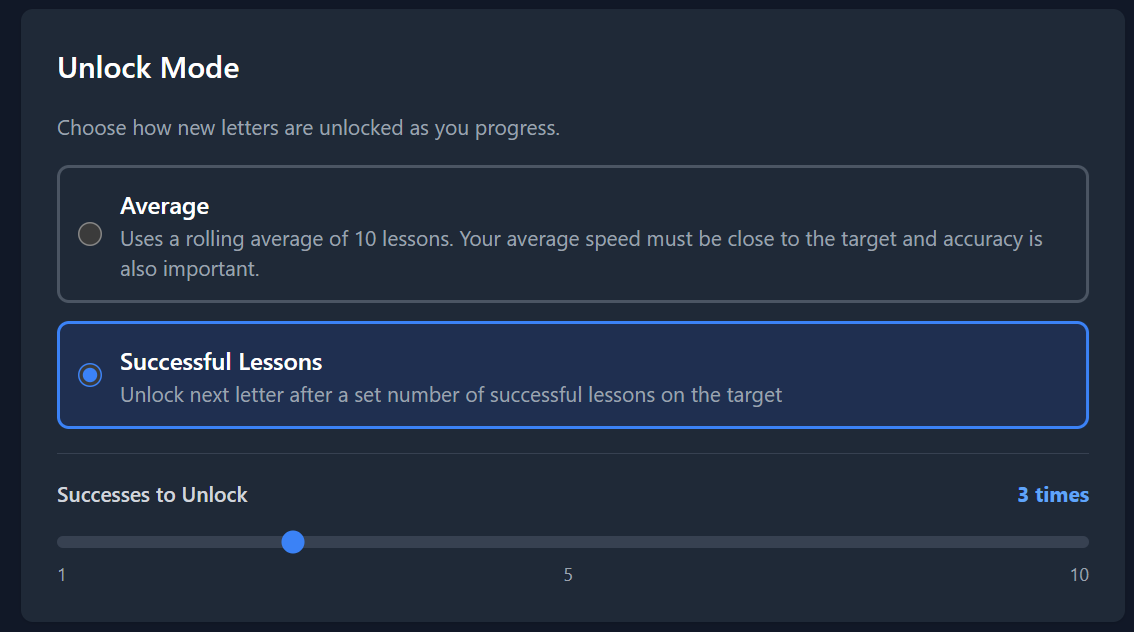
And the part that matters for this article - I added a new letter unlocking mode in TypeStep based on a successful lessons counter. By default you need to complete 3 lessons in a row where your speed is close to the target and accuracy is high - and then the next letter unlocks. You can set it from 1 to 10 lessons depending on how confident you want to be before moving on.
This solves the main problem with the old moving average approach - getting stuck on a hard letter. When a few bad attempts in a row drag your average down, the letter doesn't unlock even if you've basically already learned it. With the successful lessons counter you move forward after a set number of solid hits, regardless of past mistakes.
What Changes When You're Retraining From Chaotic Typing
If you're like me and already know how to type your own chaotic way - switching to touch typing feels different than starting from scratch, and it's worth knowing this upfront.
First - speed drops a lot. Not by 10%, by half or more. You were just typing your 30-40 wpm like always, and suddenly you're barely getting 15. This is normal and it passes, but in the first few days it's psychologically rough - it feels like you've forgotten how to type entirely.
Second - you'll feel a strong pull to switch back to your old way. Especially when you need to bang out something quickly for work. I'll be honest, I didn't force myself to stick to it - sometimes I typed using the touch method, sometimes I switched back to the old way. This made the learning take longer but didn't derail it. If you've got iron discipline, you can commit fully to the new method right away - that'll be faster.
Third - the pattern breaks every time a new letter unlocks. That's part of the process, not a sign something's wrong. More on this and on practice fatigue in the article about how long touch typing takes to learn.
The Real Win Isn't Speed, It's Focus
This was the unexpected discovery. After several months of touch typing, my speed using my old chaotic method and my new touch method is about the same. Touch typing didn't make me faster.
What it did give me is focus on what I'm writing. My eyes don't jump between the screen and the keyboard. I look at the text and just create it. Fewer mistakes means fewer interruptions to fix things. This is especially noticeable when writing long pieces, documentation, or prompts for AI agents.
If someone asked me now why they should learn touch typing - I wouldn't talk about speed. I'd talk about how, when you're not looking at the keyboard, you think differently while typing. And honestly, it's still a little wow moment for me - I can type without looking, and nobody around me even suspects I can do it.
Where it works less well - programming in an IDE. Shortcuts like Alt+F7 aren't part of touch typing, and they need their own muscle memory. More on this in the touch typing for programmers article.
If a Method Doesn't Click, Don't Give Up on Touch Typing - Try a Different Approach
This is probably the main piece of advice for anyone who's already failed a few times.
Back in the day Solo (a Russian typing trainer) didn't work for me - I suffered, suffered, and quit. Classmates of mine got through it - they suffered too, cursed it, but finished and ended up praising it. Different methods and interfaces work for different people.
If you tried to learn and gave up - it doesn't mean the method is bad or that you "don't have what it takes." More likely, that specific approach didn't suit you. Try a different one - where you type real words from the start, or where you can tune the target speed and pace to fit you.
Bottom Line
If you already type on a keyboard somehow - that's not an obstacle to touch typing, it's more of a starting point. Don't expect a sudden speed boost from switching. But you'll get fewer mistakes, focus on the text, and a closed loop on something you've been meaning to learn.
You can try it on typestep.app - 10 free sessions a day. The default is the 3-successful-lessons mode for unlocking the next letter. Enough to see if the approach works for you.